flowchart TB
    subgraph MAIN["Main context window"]
        A["Standing instructions<br/>(CLAUDE.md)"]
        B["The task and the<br/>conversation so far"]
        C["5-line summary<br/>from the sub-agent"]
        D["Search results only,<br/>not the files"]
    end
    subgraph SUB["Sub-agent context window"]
        E["Reads 40 files to find<br/>where sessions expire"]
    end
    subgraph TOOLS["Tools"]
        F["File search"]
        G["Live docs lookup"]
    end
    E -- "returns a summary" --> C
    F -- "results just in time" --> D
    G -- "results just in time" --> D
Gen AI Evolution: From a user and a developer’s perspective
We grew up with black and white TVs. Then came PCs, the internet and smartphones, and now AI. ChatGPT was released to the public in 2022, barely four years ago as I write this. A map of the Gen AI era, and how we adapt, from a user and a developer’s perspective.
Many of us grew up with black and white TVs. Then PCs reached our homes, the internet connected them, and smartphones put the whole thing in our pockets. Some of us joined that timeline somewhere in the middle, some were there before it began. Each wave felt enormous until the next one arrived. Now AI is the wave, and ChatGPT only reached the general public in 2022, barely four years ago as I write this.
A quick note on the word AI, because of how it gets used nowadays. Artificial Intelligence has been around for some decades, and it is already used in many applications that include your photo search, your voice assistant, the recommendations on your social media feeds and apps, the fraud checks on your card and so on. What took off in 2022 is one branch of it, generative AI. Generative in the sense that the model takes your words in as tokens, small chunks of text, and predicts the output tokens that form the words and sentences displayed back to you. The architecture underneath is the transformer, a neural network design from the 2017 paper “Attention Is All You Need” by Google researchers. Models built on it and trained on huge amounts of text are called large language models (LLMs). So when we say AI today, we mostly mean generative AI and the LLMs behind it.
Four years is not a long time. Here is the same wave counted in public code, one line of it at least, the projects that reach for a language model at all.
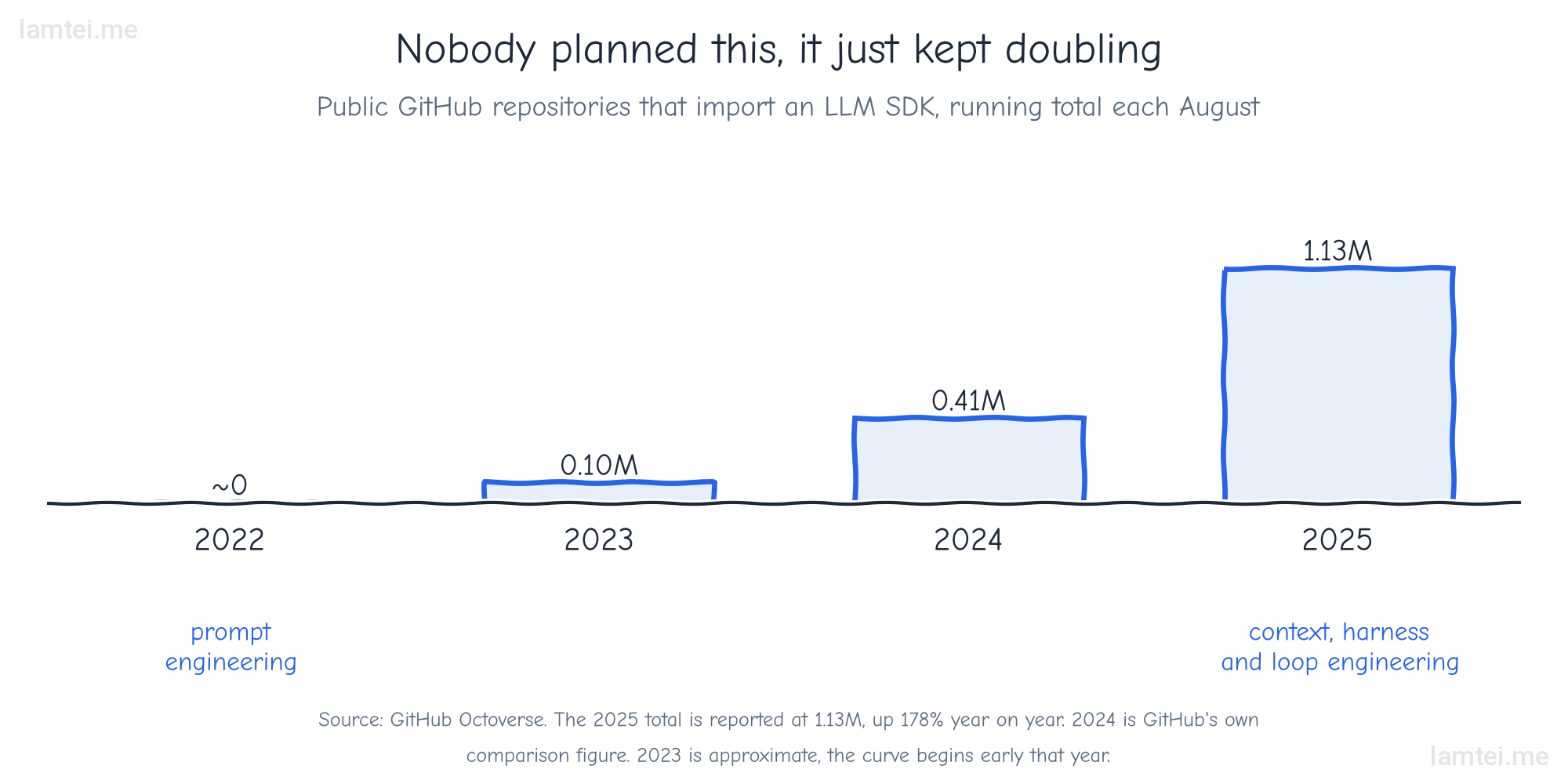
As we ride through the different eras, from TV to the internet to the information age and now the AI wave, every profession is working out what that wave means for it. This is the story inside one of them, coding and software development. But you do not need to be a developer for the map to be useful. Whether AI has already reached your line of work or is about to, the timeline is built to show three things.
- What changed while you were busy, and in what order, in The five phases.
- Where to invest so you make better use of AI, whatever your stream of work or study, in So where should you invest?
- How the industry runs AI today, agentic systems with guardrails, shown through a full business example.
The software developer story
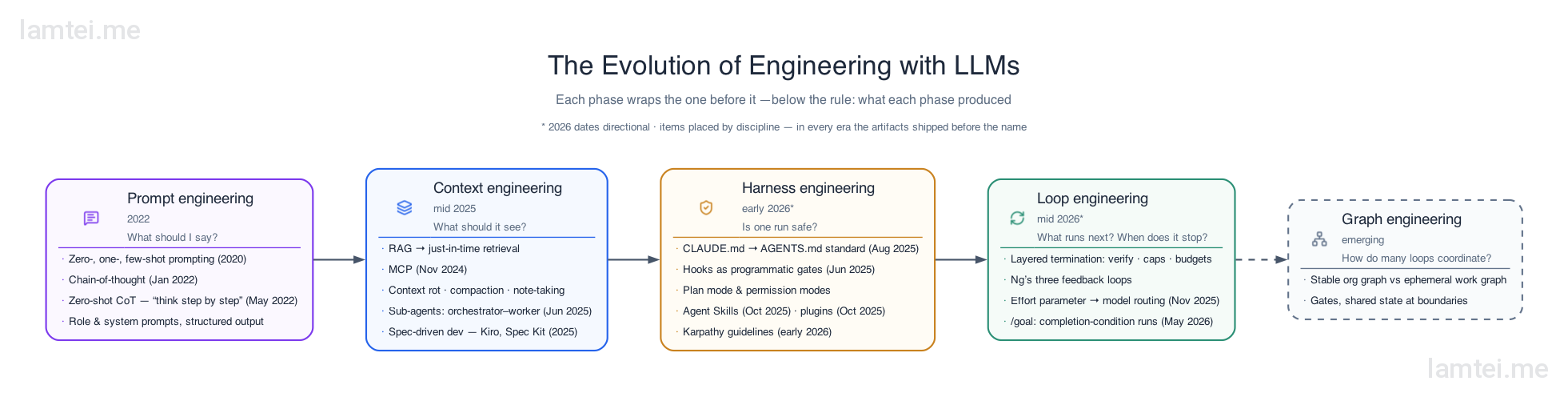
Not long ago we googled errors and dug through Stack Overflow, either waiting for answers or working them out ourselves. Then Copilot started finishing our lines as if it knew our intent, ChatGPT changed the shape of the work, and every tool since has been solving the bottleneck the previous one left behind. The skill of getting useful code out of a language model has changed its name four times in four years. The same shift is running through every other kind of user too, students getting help with projects and assignments, creators drafting their next idea, and the models have moved into images and video as well. Here is the timeline of the phases:
- Prompt engineering in 2022. Asking well: “Create a login page”, or “Show a step by step solution to my assignment”.
- Context engineering by mid 2025. Supplying the material: “Here is the full brief and the data, now do the task”.
- Harness engineering in early 2026. Setting the boundaries: “Draft anything you like, but nothing goes out without my approval”.
- Loop engineering a few months after that. Working until done: “Keep fixing it until every check passes, then stop”.
- Graph engineering already being named as the next one. Designing the org chart: “Research feeds writing, writing feeds review, and nothing ships until review passes”.
While they sound like marketing names, they are not. In fact these are the phases the work moved through from the arrival of ChatGPT onwards, each one growing out of the limits of the one before it.
I remember back in 2023 when we integrated the GPT-3.5 Turbo API into one of our applications and watched user behaviour much like an A/B test. Users could ask general questions directly inside the app. That was the first time we gave the model a role through a system prompt, so it only answered queries related to our domain. From there it grew step by step. Generic answers became a RAG (Retrieval-Augmented Generation) pipeline that could give personalised recommendations from user data, then queries, recommendations and reporting all flowed through it. A system prompt at one end, a full agent with tools and memory at the other.
Current industry practice leans on agentic AI, handing whole tasks to LLM agents instead of asking a model one question at a time.
For simplicity, we will not go deep into how agents and agentic systems are built. We will define what an agent is when the timeline reaches it, but the focus stays on the evolution of AI as users, businesses and developers lived it.
I have been a working developer through all of it, and my workflow moved through those phases one at a time. So this post does two things. First it traces the phases themselves, because the sequence makes far more sense in hindsight than it did while it was happening. Then it follows one developer’s adaptation through the same years, mine, because I lived through these phases first hand, experiencing the limits of each one and the iteration that followed as the technology improved and evolved.
A note before we start. Dates and timelines here are directional rather than exact. The purpose is to show the trend across the waves and phases, and how I used these tools as that trend unfolded.
The five phases
Some context from the developer’s seat first. Code autocomplete has existed since IntelliSense in the late nineties, and continued through TabNine to OpenAI’s original Codex model, each step predicting a slightly longer stretch of what you were already typing. GitHub Copilot grew the unit of help from a token to a block, and it was the first tool that felt like it knew your intent as you typed. It felt magical. Then ChatGPT arrived in late 2022 and created something genuinely new, the second window: the model lived in a browser tab and generated code snippets for you, your code lived in the IDE, and you were the transport layer between them, copying in both directions.
Prompt engineering was a real skill in that world for a simple reason. The model knew nothing about your codebase or your project. Everything it knew, you had typed. So the craft was in framing the ask, giving the model just enough of the problem, phrased just carefully enough, to get a usable answer back. Strip the era down and prompt engineering was one job, getting your intent across to a model that could see nothing else.
Context engineering is what the discipline became once tools could feed the model directly instead of through your clipboard. The question moved from what should I say to what should the model see. The infrastructure moment was Anthropic’s Model Context Protocol (MCP) in November 2024, a standard way for a model to reach your files, your docs and your tools. The naming moment came in June 2025, when Andrej Karpathy argued that “context engineering” had replaced prompt engineering as the actual job.
The rename stuck because context is a finite resource, and more of it is not automatically better. Every message you send in a chat carries the whole conversation with it, so the model keeps the history it needs to answer, and the context grows with every turn. As the window fills, the model’s recall degrades, which Anthropic’s engineering guidance calls context rot. Put simply, chats that run too long start giving degraded answers. So the job is deciding what goes into the context window and what stays out. In practice that means summarising long sessions, dividing the work into smaller chunks, keeping notes in files, fetching material just in time instead of loading everything up front, and handing big reading jobs to a sub-agent that works in its own window and reports back a short summary.
Here is the shape of it on one real task, an agent asked to fix a login bug.
The sub-agent read forty files, but the main window only paid for five lines. The tools fetched what the moment needed and nothing more. Everything is available, almost nothing is loaded.
Intent is what quietly lives through these renames. In the prompt era the model could only understand your intent, one carefully framed ask at a time. Once tools could feed it context, it could see the situation your intent lived in. The step after that was letting it act on your intent as a goal.
That step is what an agent is. Underneath the buzz, an agent is a small subsystem built around the model, and it takes four parts to make one.
- A role. The standing system prompt that fixes what it is and how it behaves, a coding assistant in this repo, a support bot for this product.
- Tools it is allowed to call, to read files, hit APIs and run commands.
- Memory, so it carries state across steps and sessions instead of starting fresh each time.
- A loop. The freedom to decide its own next step, act, check the result, and repeat until the goal is met.
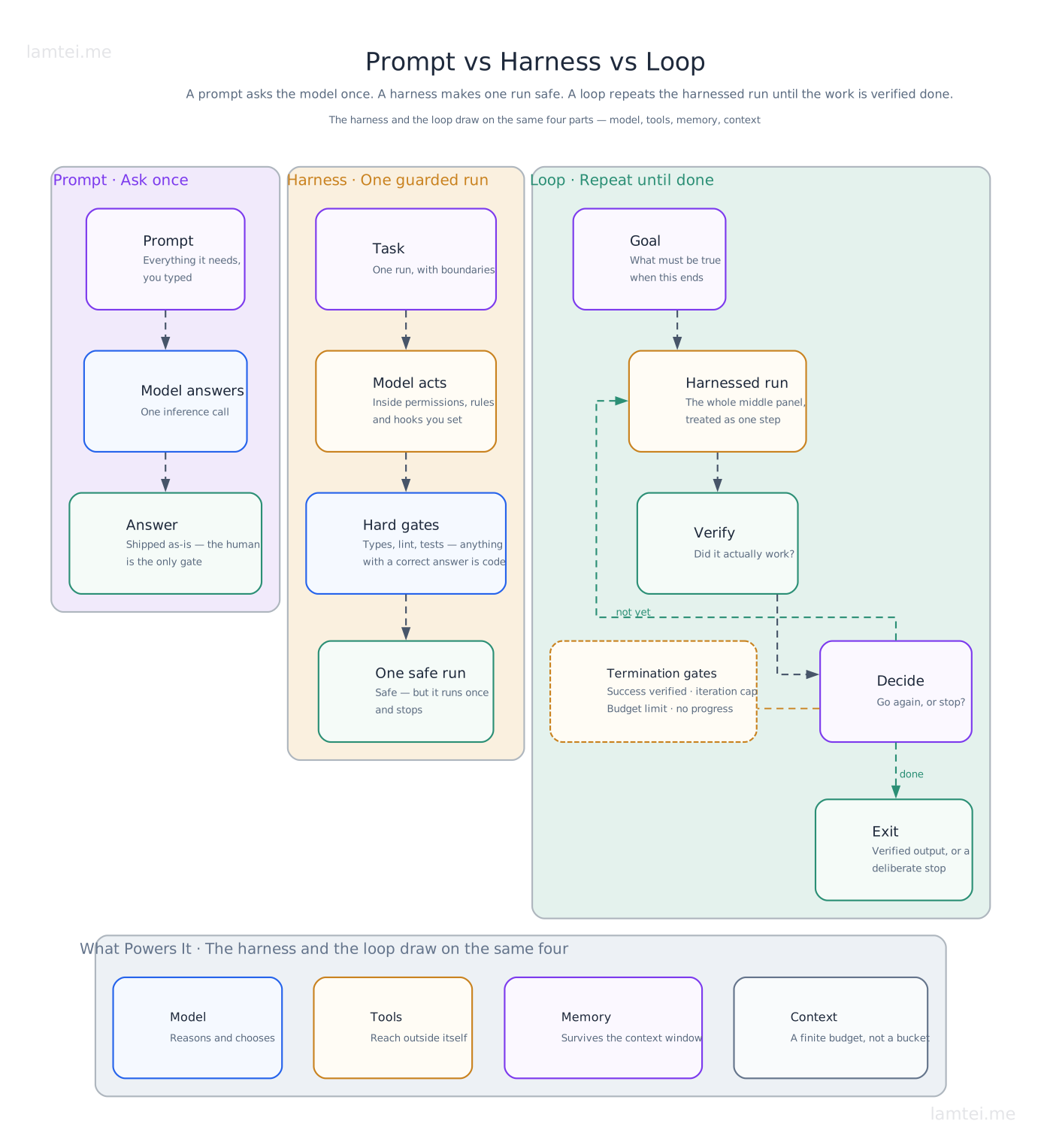
That list returns in Figure 2 as model, tools, memory and context, because a role is standing context handed to the model, and the loop is the part the agent itself holds.
This is not my framing alone. Anthropic’s Building Effective Agents describes the basic building block as an LLM enhanced with retrieval, tools and memory, and defines agents as systems that “dynamically direct their own processes and tool usage”.
Agents turned the second window into exactly that kind of worker. Devin (March 2024) demonstrated an AI that plans and executes multi-step coding tasks, and Anthropic’s Claude Code (2025), created by Boris Cherny, put an agent directly in the terminal, where a developer’s actual work lives. You will see both the terminal harness and its ecosystem again below.
For developers, tools grew up around exactly this. That is where spec-driven development and the plugins that give you agents for specific sub-tasks come from.
Kiro (July 2025) and GitHub’s Spec Kit (September 2025) pushed spec-driven development, writing the intended behaviour down before the agent starts, and “vibe coding” was positioned as its opposite in the same breath. The process divides the goal into phases, Specify, then Plan, then Tasks, then Implement, with a human in the loop (HIL) reviewing each phase and iterating where needed. And notice what breaking a plan into small tasks and handing each to a sub-agent really is. It is dividing the context window again.
Harness engineering is everything in the agent system except the model. The permissions, the hooks, the checks, the environment a single run executes inside. The discipline has one operating rule: the agent works inside boundaries you design. Put gates around what it can do so the mistake cannot happen, and when one slips through anyway, change the system so it cannot recur. The cleanest instance of the community authoring this layer is the Karpathy coding guidelines from early 2026, a shared CLAUDE.md built from Andrej Karpathy’s notes on the mistakes coding agents keep repeating, which collected over 100k GitHub stars within weeks. The reason it spread so fast is that it costs nothing to adopt. It is roughly 70 lines of plain markdown dropped into the repo root, and the agent reads it automatically on every session. Strip it to its skeleton and it is four review constraints that act as a soft gate:
- Think Before Coding: No silent assumptions
- Simplicity First: No over-engineering
- Surgical Changes: No orthogonal changes
- Goal-Driven Execution: Verifiable success criteria
Two smaller steps sit between the harness and the loop.
Skills (Anthropic’s Agent Skills, October 2025, an open standard by that December) are capability you install rather than re-prompt for, a folder of instructions and scripts the agent loads when the task matches.
Memory. Every serious agent workflow I have seen has converged on the same three artefacts, whatever it calls them: task state, a decision record, and searchable reasoning.
Loop engineering treats the harnessed run as a unit and asks what runs next and when it stops. The loop itself is simple to say.
Discover → Act → Verify → Remember → Decide, then Exit or Go again.
The harness makes a single run safe. The loop decides whether to run again. Different problems, and they were named months apart. The underestimated part is termination, and the answer that works in practice is layered: success verification, iteration caps, budget limits and no-progress detection, all at once, because any single one of them fails in some case the others catch. Andrew Ng frames the whole thing as three nested feedback loops with the developer explicitly inside them: the agent’s own write-test-iterate loop running every few minutes, the developer’s review loop around it, and an outer loop of real user feedback flowing back into the spec over days or weeks. And model routing joined the same conversation once Opus 4.5’s effort parameter (November 2025) turned compute per task into a dial, which makes model selection just another loop decision.
Figure 2 puts the three disciplines side by side, and folds discover, act and remember into the single harnessed-run step.
Graph engineering was named roughly six weeks after loop engineering, which is the best evidence that this list is still open. Nodes and edges, shared state isolated at the boundaries, gates between stages, explicit terminal states. What emerges is a stable org graph, the standing structure of agents and their responsibilities, plus an ephemeral work graph spun up per task and thrown away after.
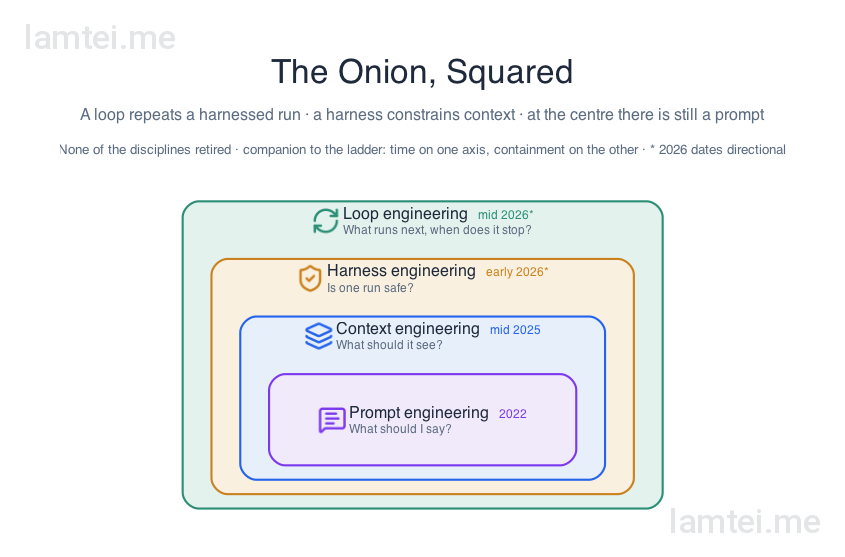
One correction to the picture before we move on. The phases are an onion, not a sequence, rings stacked one inside the other. Each discipline wraps the one before it and is the basis for the next. A graph coordinates loops, a loop repeats a harnessed run, a harness constrains context, and at the centre of all of it there is still a prompt.
And since I said the dates are directional, here is the receipts lane, the milestones that are artefact-verified, each carrying its own release date.
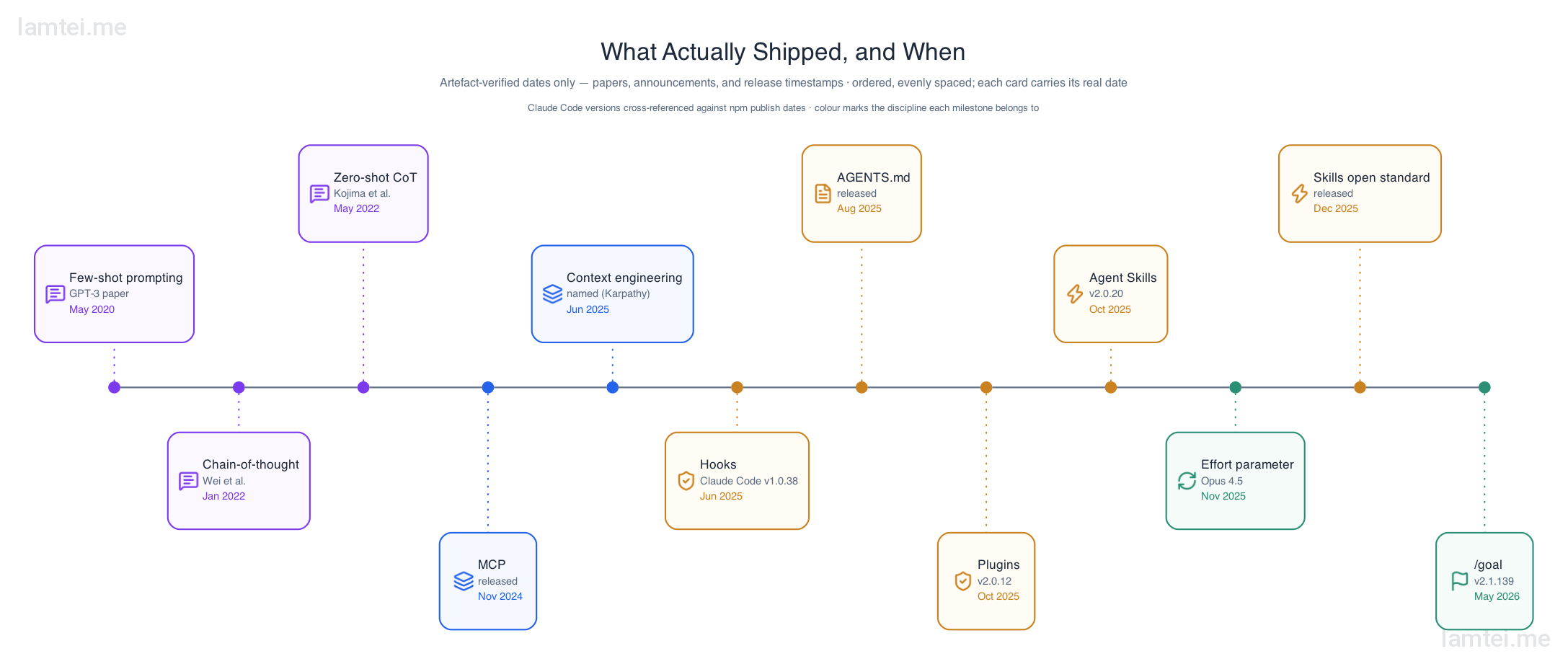
The ecosystem that grew around the harness
As users and developers, we learned to adapt to the change. The hype also leaves some of us in FOMO while the internet gets flooded with new tools, helped along by vibe coding, the term Andrej Karpathy coined for leaning on the model and barely reading the code. We are saturated with tools now because the industry is racing to adopt the technology. The models have become better, the harness and tooling have matured, and MCP has expanded what an LLM can reach. I have seen a lot of posts about workflows and pipelines, and generic ones like “X is dead, use this instead”, “You got this wrong”, “Here are X tools you need to use in Y”, “Skills to master in Y” and so on. Some are clickbait, while others give you relevant information or a combination of tools that can genuinely improve productivity. But the space keeps evolving, and knowing the tools alone goes out of date in a few months, as they either get absorbed into the ecosystem or are deprecated in favour of a better one. So understanding the reason a tool exists is as important as using it.
flowchart LR
    A["Plain model call<br/>prompt in, answer out"] --> B["System prompt<br/>a role scopes the answers"]
    B --> C["RAG pipeline<br/>retrieval grounds the answers"]
    C --> D["Agent<br/>tools and memory,<br/>works toward a goal"]
    D --> E["Agentic AI + MCP<br/>many agents,<br/>standard connectors"]
A whole ecosystem of tools has grown up around Claude Code, each one patching a limitation people kept hitting: context windows that fill up, sessions that forget, tokens that cost real money. Below is a sample of popular ones rather than an exhaustive list, in four groups.
Workflow and orchestration frameworks script the development method itself on top of the harness.
- Superpowers is an agentic skills framework that composes the whole software methodology into one chain. Brainstorm and write the spec, break the work into bite-sized plans, hand each task to a sub-agent to implement, enforce test-driven development while it codes, then review.
- ecc (Everything Claude Code) works the same ground as a harness performance system. Its agents and skills run plan, test, implement, review, verify, remember and improve as a standing cycle.
- gstack is Garry Tan’s published Claude Code setup, a set of opinionated skills that act as CEO, designer, engineering manager, release manager, doc engineer and QA, with review routing that decides which of those roles needs to look at a change.
- GSD (Get Sh*t Done) is a spec-driven system that splits work into discuss, plan, execute and verify phases, each phase running in its own fresh context window to keep long sessions from rotting.
Code intelligence tools do context engineering for the agent, so it stops reading whole files to find one symbol.
- GitNexus builds local-first repository graphs and serves them to the agent over MCP.
- CodeGraph maps the structure of your code locally with Tree-sitter, so no API tokens are burned on the analysis itself.
- Claude Context, from Zilliz, plugs semantic vector search across millions of lines directly into Claude Code.
- Graphify merges code, design docs, readmes and schemas into one knowledge graph, for projects where the answers are not only in the code.
- Serena rejects pre-built maps altogether and hooks into the Language Server Protocol (LSP), the same engine your IDE uses for autocomplete and error highlighting, to read and edit code symbol by symbol.
Session memory tools patch the forgetting.
- claude-mem saves and indexes what happened in each session so past reasoning stays searchable.
- Mem0 provides a general memory layer that any agent can read from and write to.
Claude has an inbuilt memory tool of its own, but initially it focused on within-session memory management, the model reading and writing memory files to keep its place during a single conversation. claude-mem provided the cross-session persistence in that gap. Then the tools evolved again, and Claude Code’s inbuilt memory now persists project details across sessions on its own.
Token optimization tools made the loudest percentage claims, which makes them the group worth measuring closely.
- rtk is a
PreToolUsehook that intercepts shell commands and compacts their output before the model sees it, with 33 to 99% reduction on recognised commands like grep and directory listings. - Headroom is a proxy between the agent and the API that compresses payloads by content type, AST-aware for code, with a median 54% on search results and diffs in microbenchmarks.
- Caveman injects prompts through two hooks that make the model write tersely, dropping articles and filler while keeping the technical content, for a median 50% prose reduction in controlled tests.
- pxpipe renders dense text context as images before it reaches the model, since an image’s token cost depends on its pixels rather than its characters.
- Token Optimizer works the caching side of the same seam.
NOTE: the percentage claims in the token optimization group carry a general lesson. Any tool whose pitch is a percentage deserves the question “measured on what, end to end?” A number from a microbenchmark and a number from your own real sessions are different measurements. It is worth measuring the real gain on your own sessions against what is claimed.
So where should you invest?
If you came to this map to work out what to learn, the timeline itself is the answer. Read it from the centre of the onion outwards, and stop at the layer your work needs.
- Gen AI basics first. What a model is, what it does well, and how it fails, including confidently making things up. This is the floor for every stream of work and study.
- Prompt fundamentals still matter. Every layer in this post still has a prompt at its centre. Stating your intent clearly to a model is the one skill that transfers everywhere.
- Then context. Learn to hand the model the right material for your domain, the document, the structure, the dataset, instead of only typing better sentences. This is where most non-developers get the biggest step up.
- Then tools with reach. The tools worth your time are the ones that connect to where your work actually lives, your files, your systems, your data. That is the MCP lesson, and it applies whether you code or not.
- Developers go two layers further, into the harness and the loop. The personal track below is one worked example of that path.
What this means for you. The tools to climb this path already exist inside the chat apps themselves, and you are probably using some of them already, knowingly or not.
- Start in the chat interface, the plain model call.
- Add a standing system prompt that captures your intent, most apps call this custom instructions or project instructions, so you stop repeating yourself.
- Give the model reach through connectors. File search, web search, your drive, and the sites and systems your work lives in are a catalogue of MCP connectors away, and each one extends what the model can actually do.
- Go one step further and turn repetitive work into pipelines, or schedule standing tasks such as a weekly report. The major chat apps now run scheduled prompts on their own, checking your connected sources and reporting back.
Notice that this ladder is the five phases again, built as app features.
Becoming a power user. The step beyond the chat apps is picking up the same tools the industry runs on, and they now come in every configuration.
- A harness of your own. Claude Code, OpenAI’s Codex CLI and Google’s Antigravity are the big vendor options, tied to a paid subscription or API key. Antigravity retired the older Gemini CLI in June 2026 and also ships an SDK (Software Development Kit), so developers can build on the same agent harness Google runs. Open source alternatives like OpenCode and Nous Research’s Hermes Agent are free to install, and you pay only for the model behind them, if at all.
- Your choice of model. Most open harnesses are provider-agnostic. Point them at a cloud model through one API, or run models on your own machine with Ollama when privacy matters, so sensitive files never leave your computer.
- The right model for the task. Just as important as where the model runs is which one you pick. Small fast models are cheap and fine for lookups, summaries and routine drafts. Frontier models cost more and earn it on deep reasoning and complex work. Private material may belong on a local model. Matching the model to the task is a power skill in itself, and the industry version of it is now a dial, as we saw with the effort parameter.
- Standing automation. OpenClaw turns the same agent idea into a personal assistant that runs around the clock, reachable from your messaging apps and wired to your files, calendars and devices. Hermes Agent ships a built-in scheduler for the same kind of unattended work.
- Roles through skills, agents and plugins. A skill is a composable set of instructions distilled from a pattern or repetitive task, loaded dynamically when the task matches, so the same model wears a different hat per job. A researcher for one task, a subject-matter expert for the next, a patient tutor for learning. A plugin packages skills, agents, rules and references together as one install. You collect and author these instead of re-typing the setup every time.
- MCP on your desktop. Some tools now ship as full desktop apps with MCP access to your local files and folders. Anthropic’s Cowork lets the agent work inside folders you choose, turning receipts into a spreadsheet or drafting a report from scattered notes, and OpenClaw reaches local files the same way on your own hardware.
- Orchestration and optimisation frameworks. Stanford’s DSPy treats prompting as programming. You declare in Python what each step should do, and the framework compiles and tunes the prompts underneath, which turns prompt wording into code you can version and test.
CautionSafety warning
Power tools deserve the same caution the rest of this post preaches. A standing agent runs with real access to your files, messages and accounts, and it can be misled by content it reads. Scope it to specific folders, review what a skill or plugin does before installing it, and keep approvals for risky actions. OpenClaw’s own community recommends running it isolated for exactly this reason.
The point is that these tools exist in many configurations. Cloud subscription or local models, working on local files over MCP, one-off chats or structured pipelines and scheduled jobs. Knowing which combination fits which task is what makes you a power user.
The same shift, beyond code. Everything above comes from the coding seat, but the same pattern ran through other domains at the same time.
- Design. Google’s Stitch generates interfaces from a prompt, and the
DESIGN.mdfile it introduced carries the project’s colours, typography, spacing and component rules, so every generation follows the same system. That is the CLAUDE.md idea again, wearing a designer’s hat. Anthropic’s Claude Design (April 2026) goes a step further and reads your codebase first, so the design system it works from is the one your project already uses. - Music and speech. Both have their own generation tools moving along the same curve, with the same questions about where the human stays in the loop.
- Architecture. The model design kept moving too. Diffusion Transformers pair diffusion, the method behind image generation, with the transformer from the start of this post, and that combination sits behind the current generation of image and video models.
As a rule of thumb, invest one layer beyond where you are today, then use it until the next layer becomes your bottleneck. That is exactly how the industry itself moved through the five phases.
If you are not a developer, this is a natural stopping point. You have the map, the ladder and the tools. What follows is the deeper end, one developer’s timeline through these harnesses, and then how businesses build AI pipelines out of the same parts.
Interested? Lets see how they work.
The personal track
The story so far is reconstructed from sources. This part I can only tell as experience, so read all of it with that label attached.
One line of vocabulary before the timeline. Anthropic introduced concepts like skills, which we met above, and CLAUDE.md, the standing project context file Claude reads on every session, with AGENTS.md as the same idea for other tools, now an open standard.
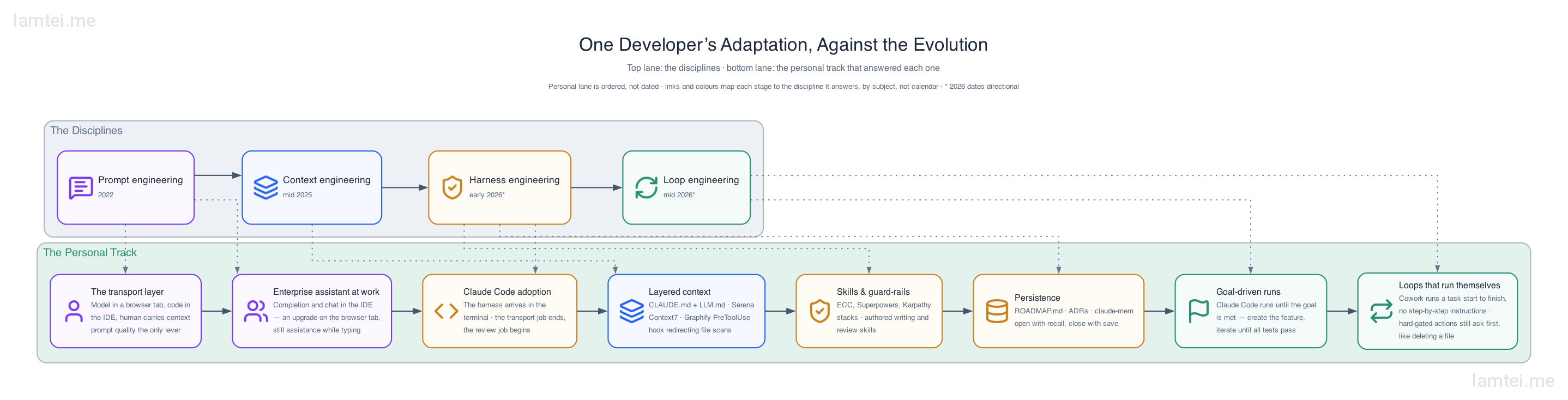
gantt
    dateFormat YYYY-MM-DD
    axisFormat %b %Y
    section The evolution
    Prompt engineering            :2022-11-01, 2025-06-01
    Context engineering           :2025-06-01, 2026-01-01
    Harness engineering           :2026-01-01, 2026-05-01
    Loop engineering              :2026-05-01, 2026-08-01
    Graph engineering (emerging)  :2026-06-01, 2026-08-01
    section My workflow
    Claude chat as transport layer (PKCE auth)     :2023-06-01, 2025-03-01
    Enterprise assistant in the IDE at work        :2024-09-01, 2025-09-01
    Claude Code in the terminal                    :2025-09-01, 2026-08-01
    Layered context (CLAUDE.md, Serena, Context7)  :2025-11-01, 2026-08-01
    Skills, hooks, memory                          :2026-02-01, 2026-08-01
    Multi-project agent loops                      :2026-05-01, 2026-08-01
My transport-layer phase looked exactly like the generic one, down to the copying. The concrete memory is building a custom PKCE (Proof Key for Code Exchange) authorization flow for Facebook and Google sign-in on a NestJS backend, with Claude open in a browser tab. I watched Claude generate boilerplate snippets, copied them over and tested them. They looked confidently good and still carried issues, in syntax, in logic and in missing context. It worked in the end, and it was also the purest possible demonstration of the model knowing only what I typed. And the coding tools evolved fast from there, from snippets in a chat to full project skeletons, files and directories created for you, and intent understood beyond a few words of prediction.
Copilot in the editor predicted the next few lines, while the chat models generated whole working chunks. Claude in particular was already good enough at coding that copying snippets between two windows beat inline prediction for anything bigger than a line.
The next passage ran through the enterprise lane. At work the sanctioned tool was an enterprise coding assistant inside the IDE, completion and chat where the code lives, an upgrade on the browser tab but still fundamentally assistance while I typed.
Then the real switch was moving to a terminal-based workflow with Claude Code, and these days the normal shape of my work is several projects with agents working toward a specific goal or task rather than a single window suggesting lines. Couple this with the new generation of terminal apps like Warp, and the limit moved far beyond editing a single file.
NoteAuthor’s note
This is an opinionated subject. Some users like coding in editors and IDEs, which is where tools like Cursor and VS Code live, while others prefer a terminal-based setup. Whichever side you sit on, you now have models that work at every scale, from scaffolding a project to editing a few lines, from building a full feature to testing and debugging it.
The most complete version of that so far has been designing Guided from scratch with the full current harness under it, gates, skills and memory from day one. The source lives on GitHub if you want to see how those gates look in practice.
By the time context engineering had a name, the structure of my setup was already moving in its direction, and the techniques from Anthropic’s guidance map almost exactly onto what it became. Below is the same idea applied to Claude Code, a terminal-based harness for coding.
- Layered instruction files carry the standing context, a project
CLAUDE.mdon top of a global one, so the constitution is written once instead of re-prompted. - Semantic retrieval through Serena means the agent looks up the symbol it needs instead of reading whole files into the window.
- Context7 pulls current library docs at the moment they are needed, which is just-in-time retrieval by another name. Similarly Exa is used for general information extraction and web search.
- Rules, skills, agents, hooks and references, defined globally or inherited per project. Some arrive as plugin packages in Claude Code. Combined with the layered instruction files, they add up to a discipline, and that is what enterprise-grade coding setups run on.
One concrete example comes from Graphify, one of the code intelligence tools above. Large repo scans used to be the fastest way to fill a context window with noise, so a PreToolUse hook now intercepts broad file-scan commands and redirects the agent to pre-built structure reports instead. Deterministic code deciding what the model may do and what it sees while doing it. Keep that hook in mind, because it is the smallest possible instance of the principle the business sections below are built on, and it came from exactly the operating rule above: the mistake happened, so the system changed.
Skills took over the middle layer. My daily stack looks like this.
- ecc for language-specific build, test and review flows.
- Superpowers, held back for architectural decisions.
- The Karpathy guidelines as the standing review constraints.
- Playwright and a docker-dev skill on top for their niches.
I have also started authoring my own. A project-resume skill, GitHub skills, ADR and documentation skills, and the writing-style skill, to name a few.
Persistence is the centrepiece, and I want to spend a moment on why. An agent with no memory re-litigates every decision, and the failure is worst exactly when the work is going well, because long productive sessions are the ones that outgrow the window. So the workflow converged on a discipline: open every session with recall, close every session with a save.
ROADMAP.mdcarries the task state.- Architecture decision records carry the decisions.
- claude-mem makes past reasoning searchable, with trigger phrases like “what did we decide about X” wired to query it.
I arrived at this through my own repeated mistakes, and only later read Anthropic’s structured note-taking guidance describing the same system. Landing on the same answer independently is decent evidence the practice works.
That persistence discipline is one instance of a pattern that runs through my whole setup. The harness has a gap, I patch it with a skill, a rule or a hook, and some months later the harness grows the same ability natively, at which point my patch either retires or shrinks to a thin wrapper.
The cleanest example is a project-resume skill I wrote for continuing work across sessions. It used ROADMAP.md as the main index, pointing at one markdown file per session, so any new session could rebuild its state by reading the index. Then claude-mem made past sessions searchable, and now the harness maintains a MEMORY.md and progress notes on its own. Each step absorbed a little more of my patch.
The same story repeats across the rest of the toolchain: a docker check before anything runs, CLAUDE.md variants adapted to whichever tool is reading them, and hooks and skills whose disciplines shift with the type and stack of each project. Here is the whole pattern in one picture, my patches on one side and the harness catching up on the other.
| The gap | My patch | The harness, later |
|---|---|---|
| Sessions forgot everything | project-resume skill, ROADMAP.md as the index, one .md file per session | claude-mem plugin, then built-in MEMORY.md and automatic progress notes |
| Repo scans flooded the context window | Graphify PreToolUse hook, pre-built structure reports |
still my patch |
| Environment drift broke runs | docker-dev skill, container checks before anything runs | still my patch |
| One instruction file, many different tools | layered CLAUDE.md / LLM.md, adapted per tool and per stack | AGENTS.md as an open standard |
| A new ad-hoc workflow for every project type | ecc and Superpowers skills, scoped by language and phase | plugins and the Agent Skills standard |
Routine and repetitive patterns of work go to skills, full reasoning is saved for the hard part of the task, and the token-compression plugins are held as optional rather than always-on.
Where this lands, for me, is a two-tool answer rather than a product ranking. I reach for Claude Code when I want the harness in my own hands, every gate and hook mine to set. I reach for Cowork when the loop can run itself, and I have noticed that the moment the loop runs itself, grounding and verification stop being a step and become the whole job. That observation is doing a lot of work in the conclusion below. Both tools operate at any phase of the evolution. The difference is who holds the loop.
And the evolution has quietly stopped being about code. The same spec-first pattern now runs my non-coding projects, canonical YAML or JSON specs as the source of truth in one, a scaffold-first build in another, which suggests the disciplines in this post are general work patterns that many programmers discover.
The conclusion of this track is simple. As users, we point these harnesses, tools and skills at our own projects and tasks, where a mistake costs only our own time and we are close enough to catch it. The intriguing question is what happens when a business hands the same system real actions, money, customers and data, and nobody can watch every step. That needs a controlled and secure environment for the model to act in, and it starts with one principle.
The gates principle and why it matters
Every one of these phases keeps re-answering the same question: where does deterministic code end and the model begin?
Those two words are worth defining before anything else. Code is deterministic. The same input always produces the same output, the flow is planned and the outcome is programmed, so it can be tested and trusted. A model is non-deterministic. Its answer is generated fresh each time and can vary between runs, which is exactly what makes it good at generative work like drafting and interpreting, and a poor fit for steps that must come out the same way every time.
Anthropic’s Building Effective Agents draws the line explicitly. Workflows orchestrate LLM calls through predefined code paths with programmatic gates on the intermediate steps. Agents direct their own process, and for exactly that reason need sandboxed environments, guardrails and extensive testing. The same principle applies: start with the simplest thing, because many problems need one well known pattern of an LLM call with retrieval, not an agent. You have already seen this distinction drawn in Figure 2: the workflow asks once along a path you predefined, the agent holds the loop itself.
The same boundary gets taught as a design skill in Anthropic’s foundation courses, and it is worth stating as a pair. Hard gates, meaning plain code, for anything that has a correct answer: permissions, schema validation, iteration caps, spend limits, compliance checks. The model as a soft gate or interpreter only where the task is inherently generative: understanding what a customer meant, parsing a messy document, drafting a response.
NoteAs a rule of thumb
If a wrong answer is expensive and checkable, gate it with code. If a wrong answer is cheap and fuzzy, let the model interpret, and keep a human review downstream. We will walk through a full enterprise example of exactly this split in the next section, a support bot handling a refund.
If you use Claude Code, you have already touched this principle. A PreToolUse hook is a programmatic hard gate in the most literal sense, deterministic code that runs before the model is allowed to act. The Graphify hook from the personal track was exactly this, one deterministic gate on what the agent may scan and see. The Karpathy guidelines sit on the other side of the same line. They are instructions the model reads and follows, so enforcement stays model-driven, which makes them a soft gate, valuable but not guaranteed the way a hook is.
The same evolution, wearing a suit: how enterprises use these systems
The same phases are being adopted inside companies too, just more carefully dressed. Agents are not replacing traditional software workflows. The workflows are absorbing agents, one step at a time, wherever judgement is cheap and the volume is high. Agentic AI plus MCP connectors now automate the manual flows where a wrong answer carries little risk.
- Summarising output through a RAG pipeline.
- Parsing incoming documents into structured fields.
- Creative exploration, like drafting product advertisements.
Wherever real risk enters, programmatic gates take over. What separates one company’s bot from another’s is mostly what its MCP connectors can reach. A support bot that can see billing, orders and the policy wiki is a different product from the same model with none of them. So capability conversations in enterprises quickly turn into connector conversations.
The deterministic and non-deterministic split from the gates section is the sorting rule here. Every step in a business flow is sorted by its risk profile. Steps that are expensive if they go wrong belong in deterministic code, and steps that are cheap if they go wrong can go to the model.
Lets see the split with a full example: a customer support bot that has just received the message “my order arrived broken, I want my money back.”
The model does what only a model can do. It reads the messy, angry, free-form message and works out that this is a refund request. That is a soft gate, and interpretation is the right job for it, because there is no schema for how upset customers phrase things. But the moment money enters the picture, every step with a correct answer runs as plain code:
- Identity. Is this an authenticated session tied to the account that placed the order? The session check is code, and it runs first, because it is the security boundary. The model’s opinion of who is asking is never consulted.
- Eligibility. The order record comes through the MCP connector to the order system. The order exists on this account, sits inside the refund window, and has not already been refunded. Rule and schema checks all the way down, and purchase date plus refund period is date arithmetic. Code, not judgement.
- Spend limit. Below the auto-approve threshold, deterministic code issues the refund and writes an audit log entry. The threshold is a number, not a judgement. Above it, or if any earlier gate failed, the case escalates to a human with the full context attached.
The model reappears only at the very end, to draft the reply the customer reads, and even that draft is grounded in what the gates actually decided, not in what the model thinks might be nice to promise.
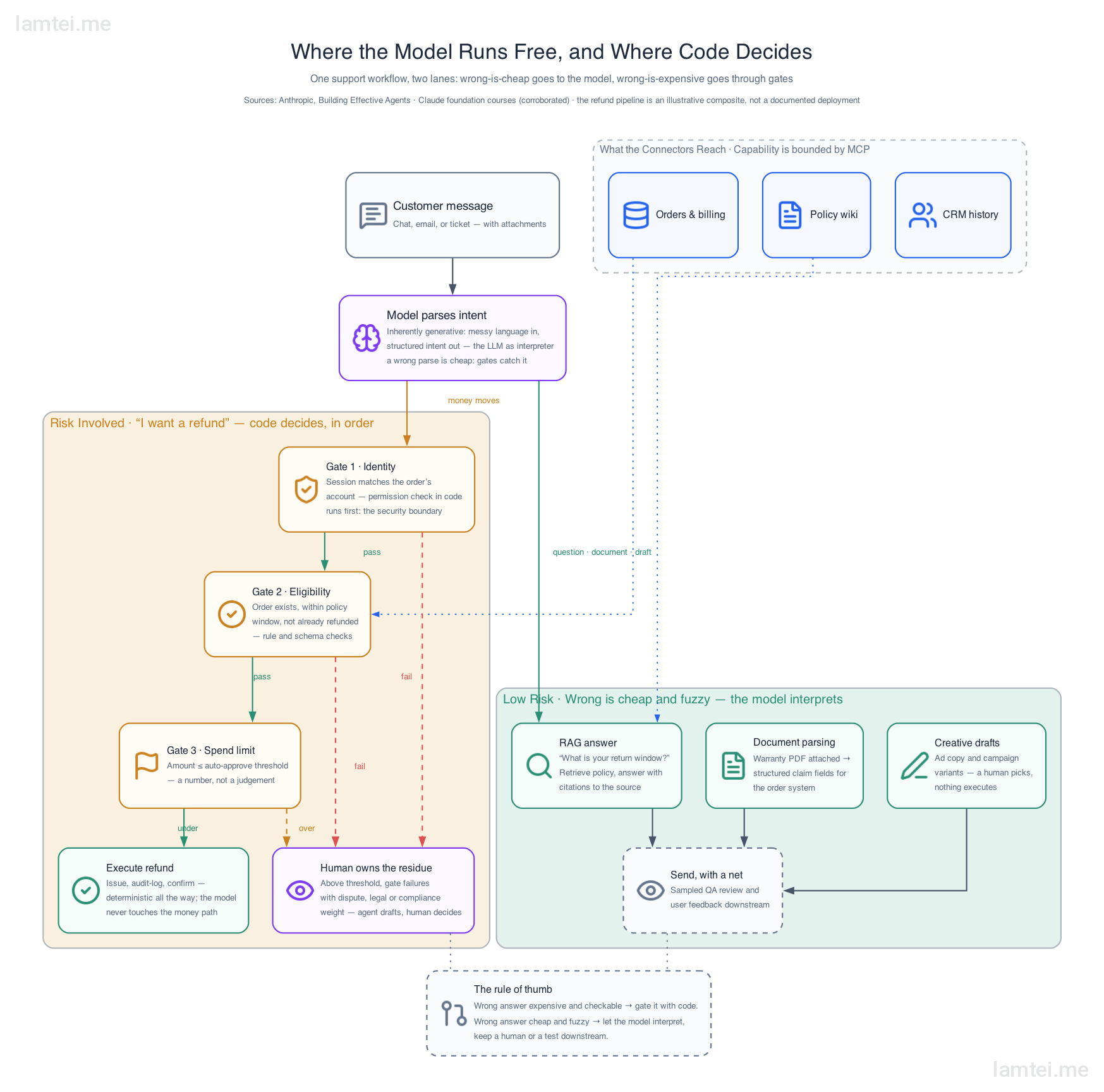
Now notice what this design buys you, because that is the real payoff. Every gate has a correct answer, so every gate is unit-testable. You can prove the bot never refunds an unauthenticated request, never refunds outside the policy window, never exceeds the threshold, all without ever invoking the model. The audit log gives you a trail to check after the fact.
Please note that this is not a full production system, but just an illustration of how gates are used with AI models in a controlled enterprise environment.
The only parts you cannot test deterministically are reading the intent and drafting the reply, and those are exactly the parts where a wrong answer is cheap. A misread intent lands at a human. A clumsy draft is just clumsy. The expensive mistakes have been made impossible by construction rather than unlikely by prompting.
That is the gates principle applied to an org chart. The model resolves the routine majority, and humans stop reviewing everything and start reviewing what is left, the decisions with legal, compliance or other sensitive weight.
Where this leaves the job
Production software still needs experienced engineers, and the productivity story is mostly a relocation story. What feels like getting faster is really the work moving. Authoring, which used to consume most of the time, has compressed. Reviewing, which was always the step that protected production, is now most of the job. Every trend in this timeline points the same way, from writing code to reviewing code and making product decisions one level up.
The danger is skipping the most important step, the review. AI output is convincing by construction, and that is precisely what makes the bad versions of it dangerous and hence the term AI slop. The evidence has been accumulating through this whole post. Ng’s loops put the developer in the feedback loop as a reviewer, not a typist. The most-starred piece of community harness engineering of the era is four review constraints. Loop engineering’s hardest sub-problem, termination, is a review question wearing an engineering hat: how does the system know the work is done and right?
AI can review code too, and that helps. The same applies to other domains. A review agent catches the obvious problems before a person ever looks, so the human pass gets faster and can spend its attention on what actually needs judgement. But faster review is not the same as no review. The human in the loop stays, the same way the refund flow in the previous section still escalated to a person once the stakes crossed a line.
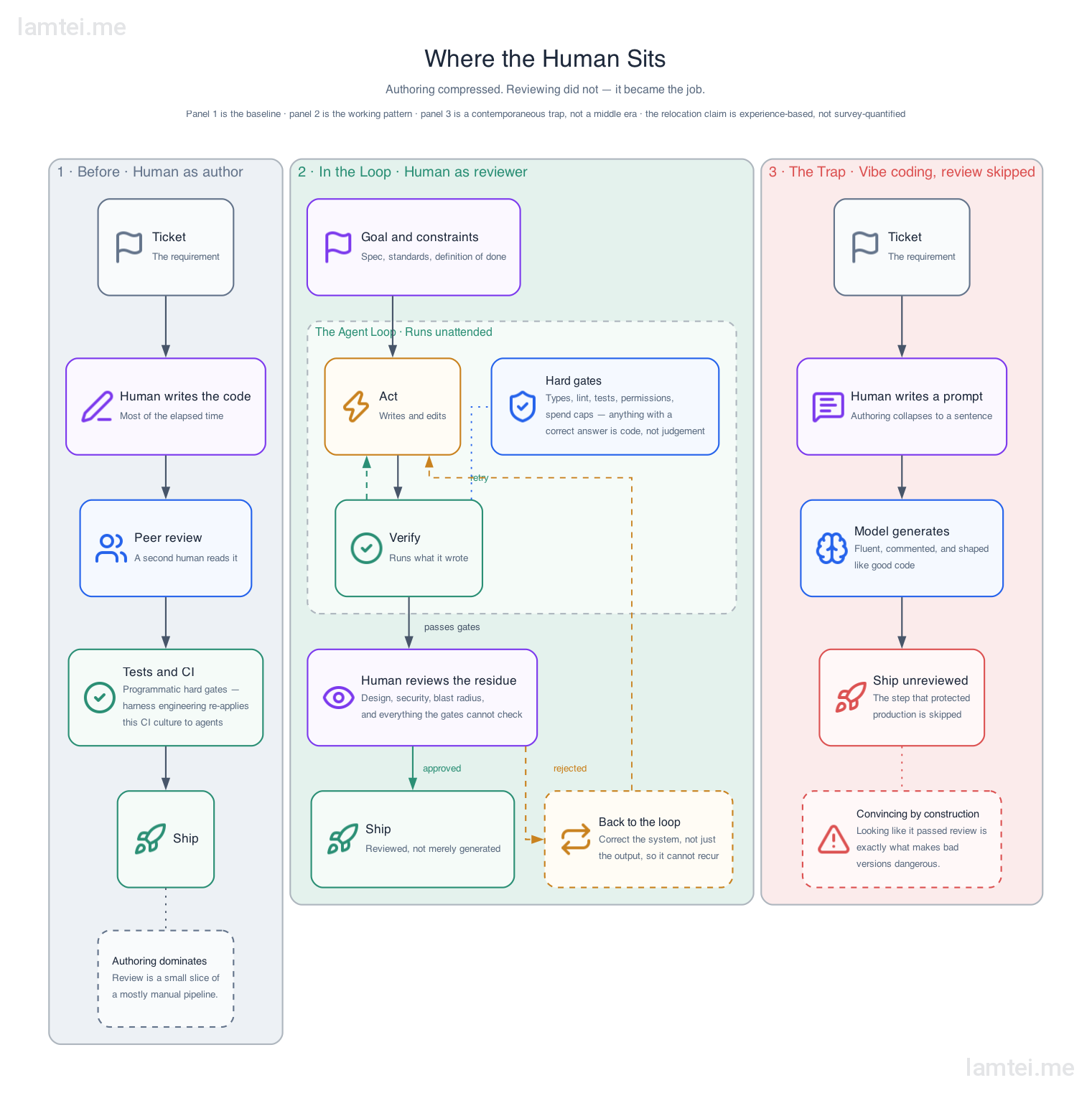
And be honest about the cost column. Paying for tokens to accelerate authoring is a fine trade. Paying for skipped gates on the way to production is not, and that bill arrives later and larger. It is worth asking whether letting AI do everything for you is still a good deal when the price includes a production database.
Depending on the project, an independent side project or an enterprise product, wherever real data is involved the quality bar needs experienced engineers holding it, and then the productivity gain is real. Compromise it and convincing slop ships to production. The risk is not theoretical.
The evolution is still moving. Graph engineering arrived weeks after loop engineering was named, and something will follow it. But the constant through every rename has been the same: the engineer’s judgement moved up a level and became more valuable, not less. I do not expect the next rename to change that either.
I hope this post gives you a good picture of AI tools and the trend behind them, whichever seat you read it from. What’s your story? Happy coding 🙂
References and resources
The sources this post leans on most, gathered in one place.
- Building Effective Agents, Anthropic’s definitions of workflows, agents and the gates between them.
- Effective context engineering for AI agents, the context rot guidance and the working techniques.
- Anthropic Academy, the free foundation courses behind the hard-gate and soft-gate framing, from no-code AI fluency to Claude Code and MCP.
- Model Context Protocol, the open connector standard behind most of the reach in this post.
- Andrej Karpathy’s coding guidelines, the community-authored harness constraints.
- Andrew Ng on the three nested feedback loops of agentic development.
- Kiro and Spec Kit, the spec-driven development tools.
- Claude Opus 4.5 announcement, where the effort parameter turned compute per task into a dial.
If you liked this story, follow me on Medium for more tech related posts, or subscribe here to get new posts from this blog in your feed reader.